Showing posts with label Hosting. Show all posts

Friday, 19 July 2019

Hostinger Review 2019 - Quality, Speed, Price and Comparison


Founded back in 2004 as 'Hosting media', Lithuania-based Hostinger has expanded to become a popular web hosting provider with more than 29 million customers, and offices around the world.


The company website doesn't try to put a gloss on its service by talking about 'value' products or a 'budget' range. It gets straight to the point: Hostinger is all about 'cheap web hosting'.
The range starts with a 'Single Shared Hosting' plan aimed at home users. This is currently on offer for $0.80 per month.  This plan limits you to a single website and subdomain, 10GB of drive space, 100GB bandwidth a month and just a single email address. An Easy Website Builder makes it simple to get started, though, and there are one-click installers for WordPress and other popular apps. The package is probably enough to run a simple personal or family site.
If you've bigger hosting ambitions, the 'Premium Shared Hosting' plan might be a better deal. It's currently available from as little as $2.15 per month but lifts all the restrictions, giving you unlimited drive space, bandwidth, subdomains, databases, FTP users and email accounts, and supports as many websites as you need. 
All Premium plans include an 'Optimised Speed' system for up to three WordPress sites, SSH access is available, and you get a free domain name with the annual plan.
The 'Business Shared Hosting' plan, which is currently available from $3.45 per month, throws in a free SSL certificate, along with daily backups and more processing power. 
All subscribers receive 24/7 online support, no matter what plan they have chosen.
More demanding users could try one of Hostinger's VPS plans. These start at $3.95 a month for a reasonable specification: 1GB RAM, 2GB burst RAM, 20GB hard drive, 1000GB bandwidth. The plans aren't very customizable, but with six to choose from, there's a good chance you'll find something that works for you.
All the plans are covered by a 30-day money-back guarantee. This has the usual restrictions you'll get with hosting – you won't be refunded for registering a domain name, for instance – but we didn't notice any other sneaky clauses which might catch you out.

Account setup

While many hosts are annoyingly vague about the low-level details of their packages, Hostinger spells out almost everything in a lengthy comparison table. Delving into this, we only spotted one restriction we hadn't noticed before, but it was an important one: the limited 'Single Shared Hosting' plan doesn't support SSH (Secure Shell) access.
Choose a plan, click Buy and you might get your first surprise – the quoted prices assume you're paying for four years upfront. If you'd prefer the one-year option, the ‘Single Shared’ plan will cost you an extra $1 a month.
Still, on the positive side, you can purchase up to four years of Premium web hosting for only $2.15 a month, or $103.20 in total. That's good value for a package with unlimited websites, web space and bandwidth.
The website page didn't drown us with extra offers, and upselling efforts were kept to a minimum. The only significant new purchase option was a shared SSL certificate for a one-off $11.95. Pay the fee just once and you're covered for as long as you stay with Hostinger. You can also choose to pay for ‘Priority Support’ which bumps you to the top of the queue if you have any issue you need addressed. This starts from as little as $1.99 per month if you pay for three years upfront.
We chose a plan and were prompted to create an account. Hostinger has options to sign up with Facebook and Google, unusually, which is convenient but not so secure (anyone with access to your credentials or a device logged in to Facebook or Google could access your hosting account, too). It's easy to create an account manually, though, and Hostinger only needs a few details: name, email address and password.
There are plenty of payment options available, including PayPal, credit card and Bitcoin. We chose PayPal and handed over our virtual cash in the usual way. A website link took us to a simple startup wizard and a welcome email quickly arrived with more details.


Creating a site

Hostinger's setup wizard opened by asking us whether we wanted to register a new domain, transfer a domain from another company, or use an existing domain but leave it with the current registrar.
Advertisement
You've also able to choose where your site will be hosted, conveniently: North America or the UK.
We chose the 'existing domain' option and were given Hostinger's four name servers, and told to update our domain DNS settings. Some web hosts offer tutorials showing how to do this with popular registrars, but Hostinger doesn't make quite as much effort, stating: "If you need more help with this, you can contact the domain registrar for assistance."
The final 'Start website' step was more useful, with five options to help us create our website.
'Install WordPress' took us to a straightforward WordPress installer. All the default settings were sensibly assigned, and after choosing an admin password we could set the system up with a click.
'Auto Installer' uses the same automated approach to install many other popular apps, including Joomla, PrestaShop, OpenCart, phpBB and Drupal. We still prefer Softaculous, the installer often provided by other hosts, but this one is perfectly adequate and will get your chosen apps installed at speed.
Zyro Builder is Hostinger's website builder. This covers all the basics, with 195 responsive templates, easy drag-and-drop customizations, and options to embed videos, maps, social media widgets and simple e-commerce features.
It's not for advanced users – there's no blogging platform, for instance – and design is more about mild tweaking of a template than building something new from scratch. 
File Manager opens a browser-based file manager where you can upload your site. This will probably only work with small and self-contained sites, but it's available if you need it.
Access Manager is an unusual extra tool which allows you to give others access to your Hostinger account, enabling them to work on creating or managing the site with you. You could do something similar by sharing your credentials with others, but this is much safer. Everyone gets their own login, and the people you invite don't get full access to your account. They're able to create or edit a website page, for instance, but by default they can't buy a new product with your stored payment details, or change account details such as your registered email address.
Experienced users might skip past all of this and head straight for Hostinger's well-designed cPanel-like console, where there are all the regular tools for managing domains, subdomains, databases, SSH access, emails, FTP accounts and more.
This is a full-strength control panel, and it might be a little intimidating for hosting first-timers, but start to explore and it quickly begins to make sense. Even novice users will be finding their way around the key features within an hour or two.
Hostinger now includes a 'Power Store’ which can be accessed from your dashboard. You can enhance your website with a variety of different tools and services from here.

Performance

Everyone needs a helping hand sometimes, even experts, so it's important for web hosts to have a good support system.
Advertisement
Clicking 'Help' on Hostinger's Control Panel opens the service knowledgebase. This groups articles by common topics (Getting Started, Website, cPanel, Email, Domains, Billing), lists popular articles and has a search box to help you find whatever you need.
Some of the articles are extremely basic. When we saw the title 'How can I create an e-commerce website?' we were expecting a detailed guide, but what we got was the single line: "You can use our Zyro Website builder which can be found in your Control Panel".
The system works better with small and more specific issues. Typing 'permissions' gave us advice on setting file and folder permissions, as well as referring to specific error messages ('403 forbidden'). Entering 'change PHP version' pointed us straight to the correct cPanel module. The content of these articles was basic, but enough to point readers in the right direction.
Hostinger has a big tutorials section with far more detailed articles: 'How to Make a Website-the all-in-one Guide', 'How to Launch a WordPress website', 'How to back up your emails', and more. These seem well-written and genuinely helpful, but they're not directly searchable from the knowledgebase, and the tutorial's own search system is poor.
If you can't find what you need, 24/7 support is available (every day of the year) via live chat and a ticket-based system (not telephone). We decided to submit a query via live chat and we were connected to an agent in less than 3 minutes. 
We rounded off our tests by running Bitcatcha and other tests on our Hostinger server. The IP location showed this was allocated in the UK, as we had requested, so connections from London saw the best performance. Speeds were average from all locations, but that's what we would expect for a budget hosting service, and overall Hostinger’s performance was very acceptable.

HostPapa Review 2019 - Quality, Speed, Price and Comparison


HostPapa is a Canadian website hosting company which is still independently owned, as opposed to being a part of some massive corporation you've never heard of before. The company presents itself as a little different to the hosting giants, too, highlighting features like its support for sustainable business practices and green hosting.

HostPapa's three shared hosting plans stand out for their low starting prices and high level of features, but beware – the introductory rates are heavily discounted, and the renewal prices are relatively expensive.
The Starter account – from £2 ($2.50) a month initially, £9 ($11.25) on renewal – supports hosting two websites, offers 100GB of web space, unlimited bandwidth, 25 MySQL databases and 100 email accounts. One-click install of WordPress and other apps is available, there's a limited drag-and-drop Site Builder (three pages maximum, though), and you get one free domain registration. That'll be enough for many users, but 1&1's basic plan has fewer limits and is around half the price.
HostPapa's Business account – £2 ($2.50) a month initially, £13 ($16.25) on renewal – is essentially the same package with ‘unlimited everything’: web space, bandwidth, databases, emails and domains. It's good value for the initial contract, but there could still be better long-term deals elsewhere. HostGator'sBusiness Plan is £4.80 ($6) a month initially, but that includes a dedicated IP and SSL certificate, and it renews at £12 ($15) a month.

The Business Pro plan – £9 ($11.25) a month initially, £22 ($27.50) on renewal – extends the package further with a wildcard SSL certificate, automated website backup, SiteLock malware detection, domain privacy protection, and no page limits on the Site Builder. Once again, you get a lot for the starting price, but after that it becomes expensive. This option is probably only worth considering if you really need the features and are happy to switch somewhere else once your contract is up.
If you need more power HostPapa provides several VPS plans, but they're expensive, starting at £40 ($50) a month. The feature list is impressive, but not quite enough to justify the price.
HostPapa offers a 30-day money-back guarantee for any hosting fees you pay upfront, with the usual exceptions of domain registrations and third-party add-ons. Check the small print if you're concerned.


Account setup

HostPapa offers three shared hosting plans, and although the website is a little short on their low-level details, it'll be easy enough to figure out which one is right for you.
Signing up starts by entering your site domain. All the plans allow registering one domain for free, or you can opt to use one you own already. If you're going with the latter option, HostPapa defaults to a ‘please transfer my domain to HostPapa’ setting, but you can keep it where it is, if you prefer.
The ‘order summary’ page took our apparent £1.95 a month headline rate and translated it into a final total of £129.72 ($162). How? Partly because it's a three-year plan, and partly because HostPapa adds SiteLock and backup extras to your cart by default – plus of course there's VAT on top.
If you're looking to reduce the upfront cost, removing the add-ons cuts the total to £84.24 ($105). You can also reduce the period to anything from two years down to a single month, although the latter doesn't help much. Opting for a one-month deal costs you £8 ($10), there's a non-refundable setup fee of £10 ($12.50) for anything less than a one-year plan, and of course you'll pay the full renewal rate once your intro deal expires.
Choose your plan and you're asked to enter the standard contact details: name, email and real-world address, phone number and more. Enter your payment details, too – credit card and PayPal are supported – and you're signed up and ready to go.
The post-setup procedure isn't so smooth, mostly because there isn't one. The company doesn't give you a link to your control panel, or to a ‘getting started’ guide, or even tell you to wait for a welcome email. We were left with a summary of our hosting plan invoice, a print button, and that's about it.


Creating a site

HostPapa's website may be short on welcome details, but the company makes up for it in emails. Within five minutes of payment we had one message with a plain-text invoice, a second with a PDF invoice attachment, another more general sign-up email with an order number, and an excellent ‘welcome’ email which came crammed with essential details. A link to a starter guide, quick advice on website building, dashboard and cPanel logins, account information, FTP account details and support links – all of these things are included. Other hosts occasionally offer more – name servers would be welcome – but it's still a useful resource.
Advertisement
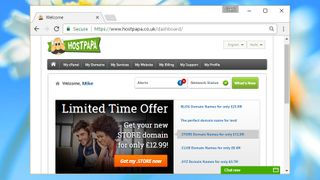
Logging on for the first time took us to HostPapa's customer portal. This loses points for the huge advertising banner right in the middle of the screen, which forces you to scroll down to see recent ticket and invoice information. All web hosts squeeze in ads wherever they can, but they're rarely as intrusive as this. 
On the plus side, the portal does give you straightforward links to cPanel, support, profile and other areas, as well as notifications and a network status indicator. Once you can ignore the advertising it's not so bad, or you can bypass the portal altogether by logging into other areas of the site directly.
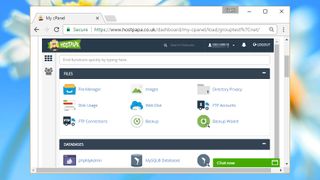
HostPapa uses cPanel as its host manager. This has everything experienced users will need, and novices shouldn't have much difficulty, either – key features like the File Manager and FTP module appear on the first screen, and a search box allows you to quickly locate anything else.
One-click installs are handled by Softaculous, one of the best installation frameworks around. We set up WordPress in a few minutes with no hassles at all, and the service also supports popular web forums, wikis, image galleries, shopping carts and more.
The drag-and-drop Site Builder isn't accessed from cPanel, rather inconveniently. It's hidden away behind a My Website button, presumably because it allows HostPapa to display an even larger ad on your upgrade options. Once discovered, the builder is reasonably capable, with 120 responsive templates and easy integration of videos, maps, forms and more. The free edition has a maximum of three pages, so your options are seriously limited, but it's still a likeable tool and we're happy it's included with the package.

Performance

We're always interested to see what support a web host has to offer, and HostPapa has an unusual extra in a free 30-minute ‘one-on-one dedicated session with a PapaSquad Expert’. This is aimed very much at beginners who'd like some help with the basics, and you should expect some attempts to sell you other HostPapa add-ons along the way, but it could still help the hosting novice.
Our own tests began with the HostPapa support pages, which didn't make a good first impression. There's no DreamHost-like search box to locate articles directly from cPanel, making sure you don't lose the context of your current task. Instead you must click a support link which replaces the current page with a support area, then click Knowledgebase to take you to the actual articles.
This part of the site is presented very well. There's a clear search box at the top of the page, with links to common categories and subcategories underneath (Hosting > Getting Started, cPanel). Every subcategory displays the number of articles it contains, giving you an immediate idea of where to look first. Or you can simply enter a keyword and see what happens.
The underlying database can't match the best of the competition. Searching for ‘import WordPress’ gave several relevant and helpful documents at DreamHost; here we had to search for ‘transfer WordPress’ to find just one. Searching for single keywords like PHP or MySQL returned a handful of relevant hits only, and even those were often very basic (‘About PHP’ included a paragraph of text and a link to Wikipedia). More fundamentally, searches don't even tell you how many matches they've found.
There are some good articles, just not quite enough, and we found just as many issues as highlights. HostPapa offers some useful general advice on WordPress, for instance, but the knowledgebase also says it has no articles in the Hosting > FTP subcategory. (There is a list of FTP clients available if you search for it, which suggests you can't completely trust the article organisation.)
The knowledgebase has a ‘Support (Live Chat/Phone/Email)’ link, but clicking it opened yet another tab – our third – and asked us to login to the dashboard again, even though we were logged in already in the first tab. You can ignore that link once you know it's not going to help, but it might make life easier if support was better integrated with the control panel.
The search area has no button to launch live chat, and no mention of any support telephone number. You have to find these back on the main site. There's a support ticket system, though, which is presumably the company's preferred contact method, so we tried that first. 
Advertisement
We raised a basic product-related question. This wasn't sent immediately to our contact email, but was easy enough to track on the website. Response time was unremarkable at around four hours, but probably acceptable for a non-critical question, and the answer was excellent: clear, straightforward, even including an annotated screenshot to explain a point.
Live chat was available on the main site, and there's 24/7 telephone support, often via toll-free numbers. We weren't entirely convinced about the agents' low-level technical knowledge, but they did well with simple queries, and if we had something complex to address we'd normally do so via support tickets anyway.
We completed the review by running a few simple server speed tests. Our page was hosted in the US so response times weren't the fastest we've seen, but running connection tests from other countries showed fractionally above-average performance.

Web Hosting Hub Review 2019 - Quality, Speed, Price and Comparison


If you have a business of any kind, you need a quality web host that will let you build a site that promotes your products and services. Web Hosting Hub offers wallet-friendly prices, excellent customer service, and strong shared hosting plans that are good for individuals or small businesses. That said, if you ever plan to expand to another type of hosting—cloud, dedicated, reseller, or virtual private server (VPS)—you'll need to look elsewhere, as Web Hosting Hub only offers the most basic services.

Shared Web Hosting
Web Hosting Hub offers three Linux-based shared hosting packages: Spark, Nitro, and Dynamo. Each plan comes with free website-building software and unlimited disk space, monthly data transfers, and email accounts. The plans are billed at one-year, two-year, and three-year rates. Web Hosting Hub lacks monthly subscriptions. This may not have much (if any) impact on businesses, but a cash-strapped blogger may not appreciate the inflexibility. And that's exactly the sort of user who's most likely to want shared web hosting.
The entry-level Spark plan (starting at $8.99 per month) includes a free domain, the ability to host two websites, and 25 sub-domains. The small business-friendly Nitro (starting at $12.99 per month) ups the ante with the ability to host unlimited websites and sub-domains. The highest-tier Dynamo (starting at $16.99 per month) is designed for highly trafficked sites and as such, gives your site more server resources.
Web Hosting Hub

WordPress Web Hosting

Web Hosting Hub offers WordPress hosting, a type of hosting that comes with the popular content management system pre-installed in your allotted server space. The three plans—Spark, Nitro, and Dynamo—carry the same pricing and specs as Web Hosting Hub's shared hosting tiers, but they also boast WordPress-specific features and security. As a result, Web Hosting Hub's WordPress plans are quite good.
The top dog gives you three tiers of WordPress hosting, as well as the option for Linux- or Windows-based servers. The packages start at $8.95 per month (for unlimited storage and monthly data transfers) and scale up to $16.95 per month (for all that, plus unlimited site hosting). Its pre-built environment comes with many WordPress-friendly features, including live malware protection and curated plug-ins that are designed to enhance your experience.

Building a Website

Roughly five minutes after signing up for the Spark hosting plan, an incredibly friendly customer service representative called to confirm that I had made the purchase. She quickly walked me through Web Hosting Hub's essential features and asked if I had any previous experience building a website. A confirmation email arrived seconds after the phone call ended, as did a few other emails that contained introductory information.
After I logged into the Account Management Panel, I began to build a website. Web Hosting Hub has a simple control panel that's both functional and attractive; it's one that appears geared to those who may be intimidated by the more technical look of the traditional CPanel. You can switch between the two looks at the Account Management Panel.
I decided to build a WordPress-powered site, so I visited the Softaculous app library to install the content management system. Once installed, I tweaked the site to my liking using a WordPress theme and a variety of plug-ins. Softaculous includes several other website builders (such as Joomla and Website Baker), but I preferred WordPress's flexibility.
Web Hosting Hub

E-Commerce

PrestaShop is the default, preinstalled shopping cart app for those who wish to sell products. However, you aren't locked into using it. The MagentoFreeat Magento e-commerce app, located within the Softaculous app library, is just one of many options. I used Magento to create an attractive store using its drag-and-drop store builder. Please read our Magento review for an in-depth look at this open-source shopping cart. OpenCart is also an e-commerce option.

Security Features

Web Hosting Hub's packages come with many security features, including McAfee Virus and Anti-Spam Protection (starting at $1.39 per month). A secure sockets layer (SSL) certificate, which you'll need if you want to sell products, costs $99 per year.
If you're going to build a website, you should safeguard its data from the times when disaster strikes. Web Hosting Hub offers automated, daily website backups (for sites 10GB in size or less) for $1 per month. That includes free account restorations available for once every four months.

Excellent Uptime

Website uptime is a vital element of the web hosting experience. If your site goes down, clients or customers will be unable to find you or access your products or services.
For this testing, I used a website monitoring tool to track our Web Hosting Hub-hosted test site's uptime over a 14-day period. Every 15 minutes, the tool pings my website and sends me an email if it is unable to contact the site for at least one minute. The data revealed that Web Hosting Hub is incredibly stable. It didn't go down once in the two-week test period.

Customer Service Chops

If you should encounter a hosting problem, or simply want to ask a question, Web Hosting Hub's wonderful customer service team is available via chat, email, and phone 24 hours per day. The team is really good, too; I didn't have to wait more than a few seconds before someone fielded my queries.
Whether via phone or web chat, early morning or late afternoon, the customer service reps were incredibly friendly and knowledgeable when I asked about the various web hosting plans and how to install WordPress. Web Hosting Hub has one of the best customer service teams I've dealt with since I started reviewing web hosting services.

Money-Back Guarantee

Web Hosting Hub has a very generous 90-day money-back guarantee.